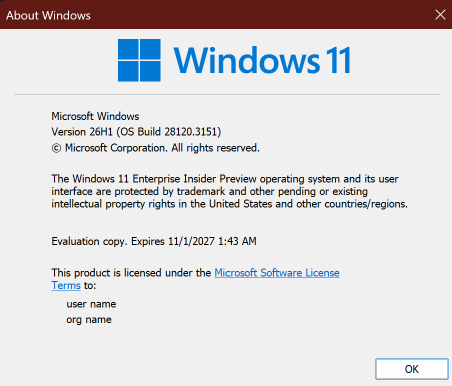
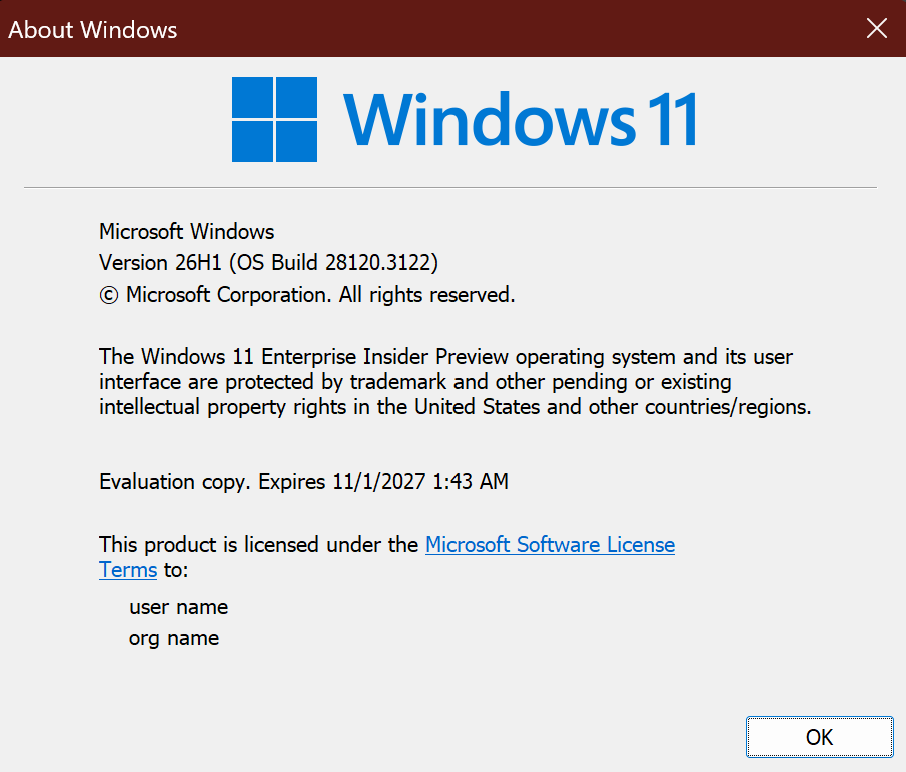
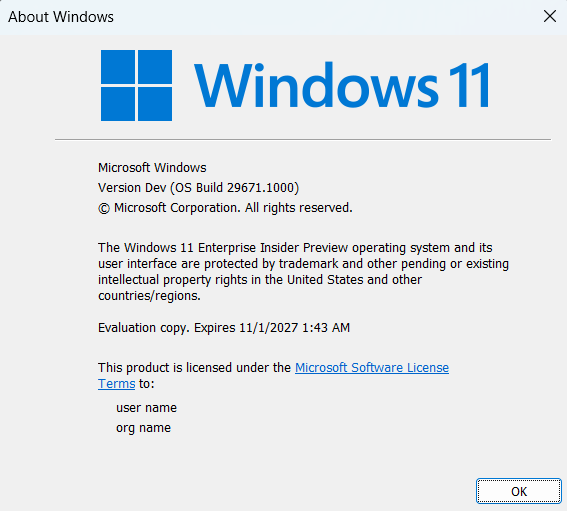
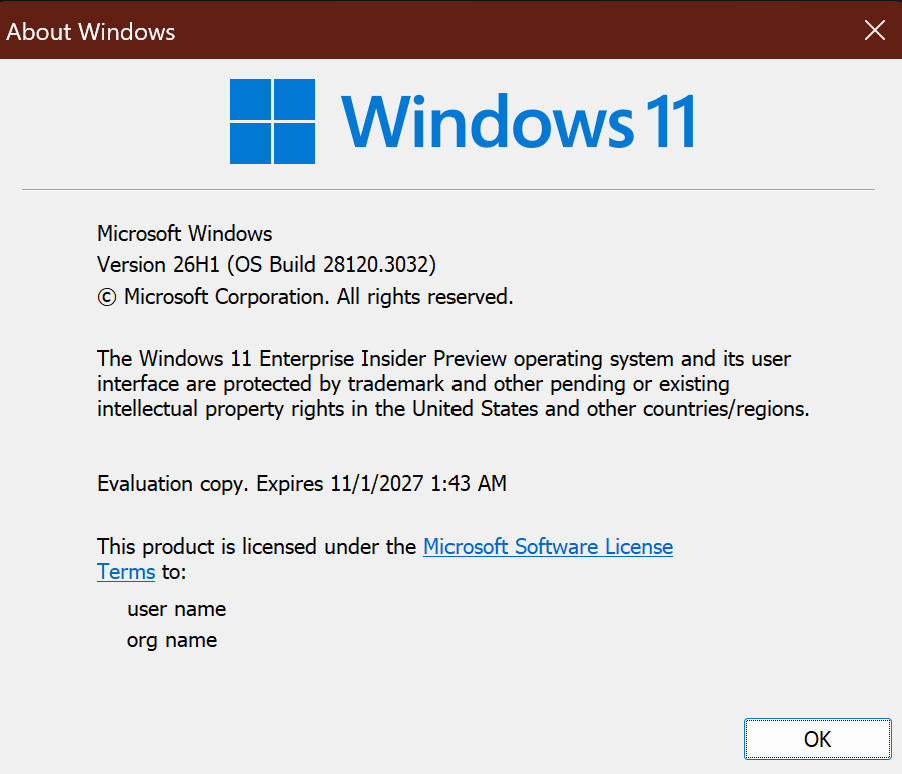
Hi all, last Friday Microsoft released Windows 11 Build 28120.3151 to the Experimental (26H1) Channel
screenshot of winver shoring the build number
Smooth and fast flights for all my devices in this channel, the cloud rebuild option works great !
Changes and improvements gradually being rolled out*
This update includes a small set of general improvements and fixes that improve the overall experience for Insiders running this build on their PCs.
[Windows Magnifier]
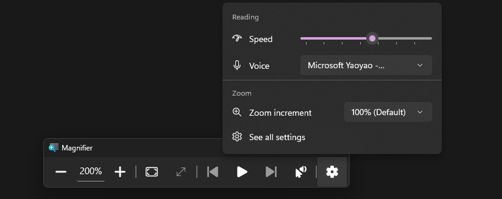
Magnifier now gives you more control over how you zoom. You can type an exact zoom percentage directly in the Magnifier toolbar to land on precisely the level you need.
We’ve also added preset step increments (5%, 10%, 25%, 50%, 100%, 150%, 200%, and 400%) to the Settings dropdown, so you can jump to common levels in a single click. Whether you need a subtle boost or a dramatic close-up, Magnifier adapts to how you want to zoom.
Enter an exact percentage or jump to preset steps – 5% up to 400%.
[Cloud rebuild]
We’re updating Cloud rebuild, the recovery option that restores a Windows 11 PC to a clean, known-good state by performing a full OS reinstall, with two additions.
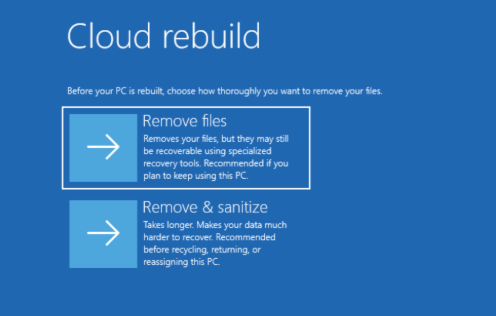
Cloud rebuild can now sanitize the device’s drives as part of the rebuild. When you start a rebuild in WinRE, choose Remove files if you’re keeping the PC, or Remove & sanitize files before recycling, returning, or reassigning it. The sanitize option uses the storage hardware’s erase capability to securely erase data before Windows is reinstalled and is irreversible.
IT administrators can now configure and start a Cloud rebuild remotely through the Recovery CSP, using either the currently installed build or a target build you specify.
UI showing new Cloud rebuild file removal options
[File Explorer]
Customizations
Improved File Explorer to keep folder view customizations, such as sorting and icon size preferences, consistent across different access paths and apps.
Address bar improvements
The address bar now supports paths containing double backslashes and quotation marks, for example, C:\Users\user or "C:\Users\user", improving compatibility with a wider range of inputs.
Improved reliability of the address bar suggestion dropdown so it now consistently closes after an item is selected.
Refinements to the rename experience
Fixed an issue where text would be repeatedly selected while renaming items in folder views.
Fixed an issue where updated names with case-only changes weren’t immediately reflected in folder views across local and cloud storage.
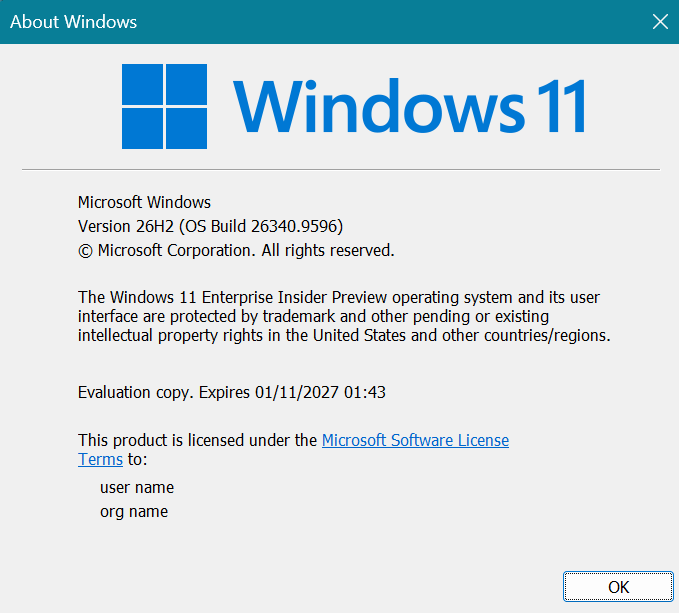
Hi all, last Friday Microsoft released Windows 11 Build 26340.9596 to the Experimental Channel
screenshot of Winver running the build
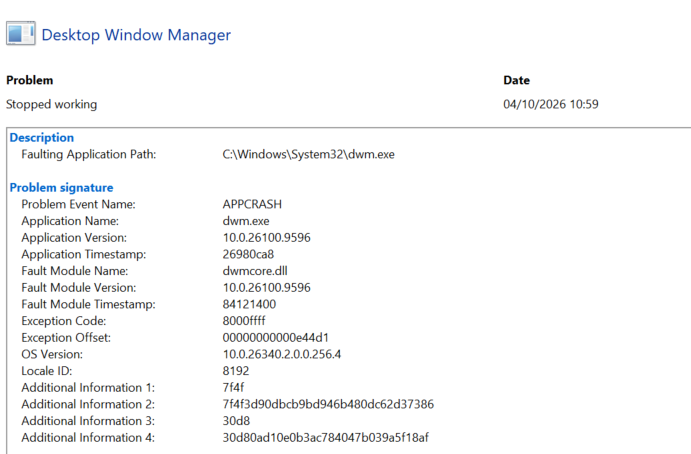
Smooth upgrades here, great spot by Maison da Silva, clicking an app card in the Microsoft store app crashes dwm.exe, resulting in a temporary freeze of the interface (Feedback Hub: https://aka.ms/AA13rrhh)
screenshot of reliability monitor showing the dwm crash
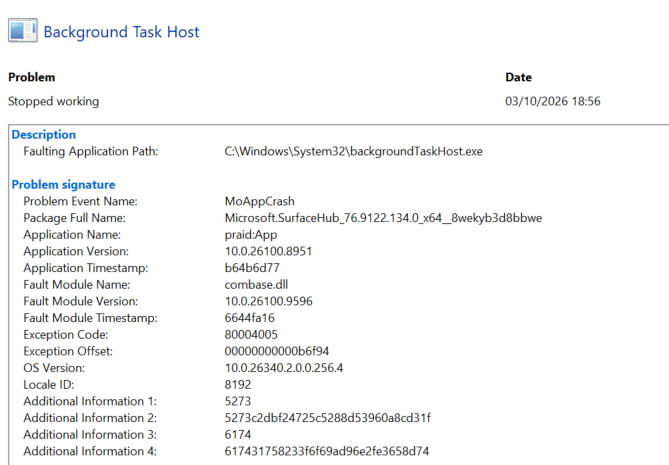
On Surface devices the surface app crashes repeatedly in the background without impact for the user (Feedback Hub: https://aka.ms/AA13rrpb) *** update, only reproduces with 2 monitors connected
screenshot of the reliability monitor showing the app-crash
Changes and improvements gradually being rolled out
[Unicode]
We’ve updated Windows text shaping support for Unicode 17.0, helping Windows correctly display and shape newly encoded characters and scripts. Unicode 17.0 added 4,803 characters, including support for four newly encoded scripts: Beria Erfe, Sidetic, Tai Yo, and Tolong Siki.
These updates help keep Windows text support current as the Unicode Standard evolves and improve support for languages and writing systems used by people around the world.
[File Explorer]
Address Bar now supports ‘~’ , making it quicker to navigate directly to your user profile folder and subfolders (e.g., “~\AppData”).
[Settings]
We’re making performance improvements to the Settings home page, which should result in reduced loading times in certain scenarios.
[Recovery]
We’re adding a new entry point for Cloud Rebuild under Settings > System > Recovery, making it easier to access the feature from Settings.
Known issues
We’re investigating an issue causing some Insiders to be unable to install the latest updates and see error 0x80073712. We believe this issue is related to having Windows Sandbox installed. As a workaround, try disabling Windows Sandbox.
Windows 11 26H2 (26300.x builds) is now generally available, and at first glance this looks like one of the easier Windows feature updates we’ve had in a while.
For organizations already running Windows 11 24H2 or 25H2, Microsoft says 26H2 uses the same servicing foundation and can be delivered to eligible devices through a small enablement package instead of a traditional full operating system upgrade.
That sounds like an easy win.
But easy to install doesn’t mean you should simply push it to every device tomorrow.
Here’s what I think IT pros should look at before starting their Windows 11 26H2 rollout.
What makes Windows 11 26H2 different?
The biggest difference isn’t really 26H2 itself. It’s how Microsoft is servicing Windows.
Windows 11 24H2, 25H2 and 26H2 share the same servicing foundation. Many of the features associated with 26H2 have therefore already arrived on devices through normal monthly updates. The 26H2 enablement package activates selected functionality and moves the device onto the new release lifecycle.
For IT departments, that potentially means:
Less disruption to users
A smaller feature update
Less validation work than with a traditional OS upgrade
The same familiar update management tools
Microsoft describes the update as requiring a single restart in most scenarios for eligible 24H2 and 25H2 devices.
That makes 26H2 interesting for anyone managing Windows through Microsoft Intune.
Don’t confuse “enablement package” with “no testing needed”
This is the part where I’d still be cautious.
Even when the underlying Windows platform hasn’t dramatically changed, the state of the device after upgrading can change.
Microsoft specifically notes that 26H2 enables capabilities for commercial organizations that had previously been controlled through temporary commercial controls.
For example, Windows settings backup is enabled by default on eligible commercial devices, although Microsoft says existing administrator-configured policies continue to be respected.
So my recommendation remains the same:
Don’t deploy a Windows feature update everywhere at once just because Microsoft made the upgrade easier.
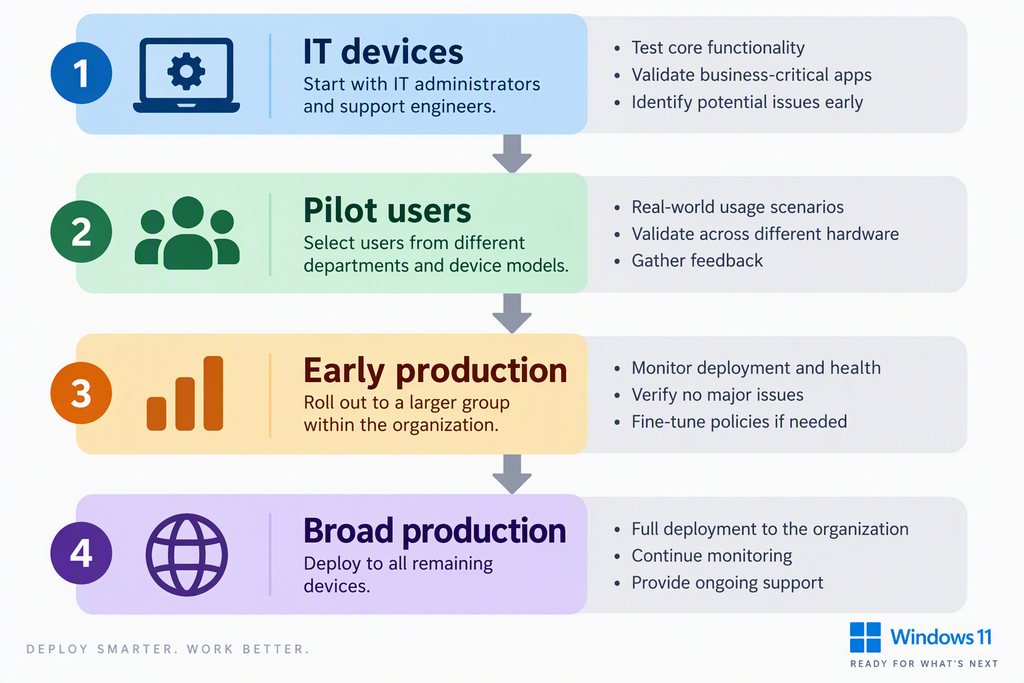
Use deployment rings.
A simple rollout model
For a typical Intune-managed environment, I like keeping the rollout understandable.
Ring 0, IT devices
Start with devices used by:
IT administrators
Endpoint engineers
Support engineers
People who can recognize and properly report an issue
The goal isn’t just checking whether Windows boots.
Test things such as:
VPN
Microsoft 365 Apps
Teams
OneDrive
Printers
Windows Hello
BitLocker
Conditional Access
Defender for Endpoint
Business-critical applications
Drivers and docking stations
Ring 1, Pilot users
Next, select users from different departments and hardware models.
Don’t make the classic mistake of testing only on ten identical Surface devices sitting in IT.
You want variation.
Ring 2, Early production
Once the pilot group looks healthy, move to a larger part of the organization.
This is where you start validating the deployment at a more realistic scale.
I would use this ring to:
Include a larger mix of users and devices
Monitor update installation and device health
Watch support tickets for unexpected issues
Check application and driver problems
Verify compliance and security policies still apply correctly
Pause the wider rollout if something unexpected appears
The important difference from the pilot ring is scale. The update has already passed technical testing, but you still haven’t exposed the entire organization.
Ring 3, Broad production
Finally, deploy Windows 11 26H2 to the remaining eligible devices.
At this point you should already have confidence from the previous three rings, but broad deployment doesn’t mean you’re finished.
Continue monitoring:
Update failures
Devices stuck on an older Windows version
Non-compliant devices
Driver problems
Application issues
Defender health
User-reported problems
The goal isn’t simply to get every device onto 26H2.
The goal is to get every eligible device onto 26H2 without creating unnecessary disruption for the business.
For example:
deployment rings flow
If something behaves differently under 26H2, you want to discover it before hundreds or thousands of endpoints have made the jump.
Check your Intune policies first
Before deploying 26H2, I’d review at least:
Windows Update rings
Feature update policies
Driver update policies
Security baselines
Settings Catalog policies
Compliance policies
Endpoint Security policies
Any existing Windows version filters
This last one deserves some attention.
I’ve seen environments where perfectly good deployment designs eventually break because somebody created a dynamic group, assignment filter or script years ago that checks for a specific Windows build or version.
Windows gets upgraded, but the forgotten logic doesn’t.
26H2 also brings new management resources
Microsoft has already published updated resources specifically for organizations evaluating 26H2, including:
Windows 11 26H2 security baseline
26H2 Administrative Templates
Group Policy Settings Reference
Windows 11 26H2 update history
Windows release health information
These are worth checking before moving your production devices.
In particular, compare your existing security configuration against the new baseline rather than blindly importing a new baseline and assigning it to production.
A security baseline should be evaluated, not simply deployed.
Intune itself is changing too
There is another reason this is an interesting moment for endpoint administrators.
Microsoft continues to change how Intune delivers software and configuration.
In the September 2026 Intune service update, for example, Microsoft introduced faster Win32 application delivery using push notifications for administrator-initiated and service-side changes. Devices can check in sooner after app changes rather than just waiting for the normal polling cycle.
Microsoft has also announced Intune deployments in public preview, designed to gradually roll out applications and device configuration policies to Windows devices using deployment rings.
It shows where modern Windows management is heading:
controlled, observable and gradual deployment instead of “assign to All Devices and hope for the best.”
And Windows Autopatch gets more interesting
There’s also an important Windows Autopatch change coming.
Microsoft says that starting October 15, Autopatch will provide more granular control over Windows quality updates, including individual approval of monthly security, non-security and out-of-band updates.
Microsoft also says updated reporting will provide visibility into approval, applicability, installation progress and deployment status.
For organizations already using Intune and Autopatch, this is something I’d definitely investigate.
It moves update management closer to the question administrators actually want answered:
“Which update is installed on which device, and where is something going wrong?”
Rather than simply:
“I assigned the policy.”
Those are two very different things.
My approach to 26H2
If I were preparing an Intune environment today, my checklist would look something like this:
1. Inventory
Know exactly how many devices are running each Windows version.
2. Check compatibility
Identify hardware, drivers and business applications that require additional validation.
3. Review Intune
Look for policies, filters, scripts or groups with version-specific dependencies.
4. Build a small IT ring
Get 26H2 onto devices belonging to people who can properly troubleshoot problems.
5. Expand to pilot users
Include different departments, device models and working scenarios.
6. Monitor
Don’t measure deployment success purely by whether the update was assigned. Look at whether it actually installed and whether the endpoint remains healthy.
7. Roll out broadly
Only after the first groups give you confidence.
Final thoughts
Windows 11 26H2 looks like a relatively straightforward feature update for organizations already running 24H2 or 25H2.
And that’s good news.
But I wouldn’t use the enablement-package approach as an excuse to skip proper deployment practices.
If anything, feature updates becoming easier means we can spend less time fighting the upgrade mechanism and more time building a proper deployment process around it.
Inventory. Pilot. Monitor. Expand.
The technology behind Windows Update has changed considerably.
Our deployment strategy should change with it.
Important note:
If you’re still running 24H2, end of support is October 13th 2026 for Pro, October 12th 2027 for Enterprise
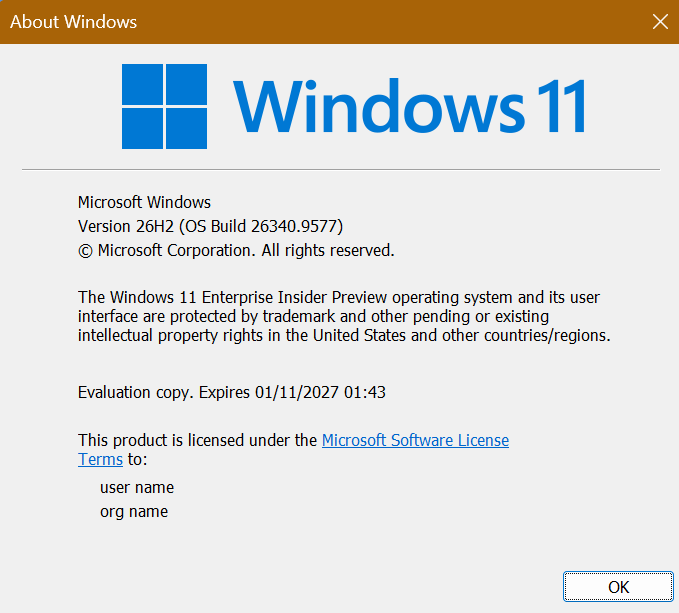
Hi all, last Friday Microsoft released Windows 11 26340.9577 to the Experimental Preview Channel
Smooth upgrades here on all experimental devices, Happy Flighting!
Changes and improvements gradually being rolled out
[Start menu]
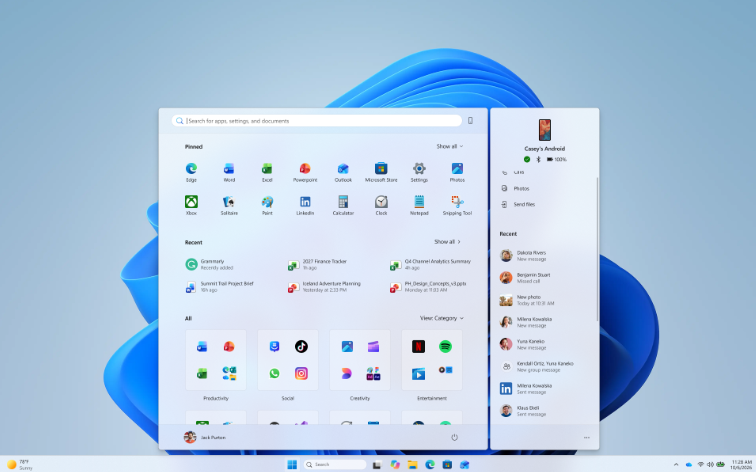
See more of your latest activities at a glance: Phone companion for the Start menu now shows more of your recent activity, with a scrollable side pane so you can view even more without leaving the Start menu.
The phone companion in Start with a scrollable pane for viewing more recent mobile activity.
[Settings]
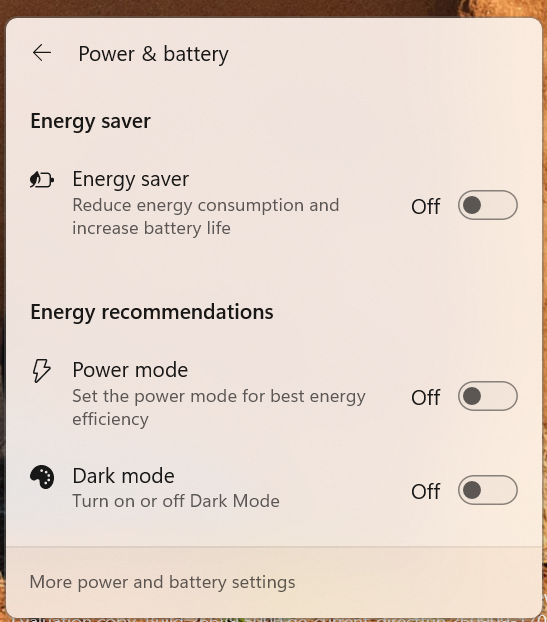
Windows Insiders will now see Energy Recommendations directly in Quick Settings, making it easier to discover and take actions that can help reduce energy consumption and improve device sustainability.
Made some small visual refinements to the design of the temporary files section under Settings > System > Storage.
[Narrator]
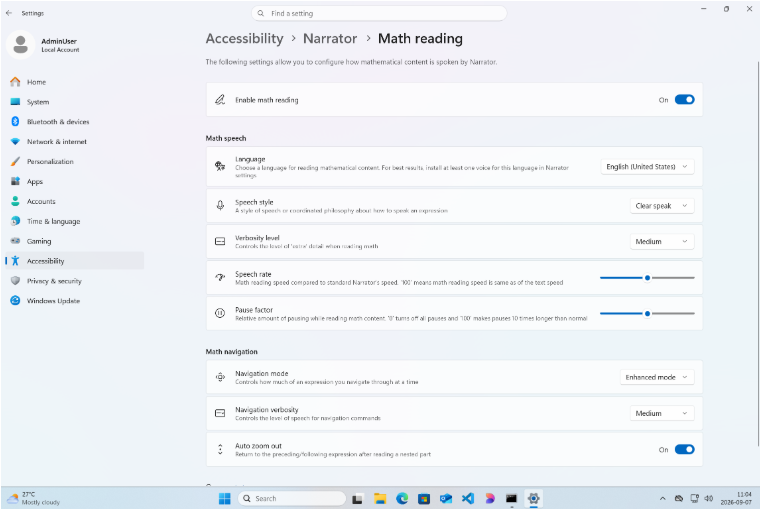
Building on the math reading and navigation support introduced for Narrator in Build 26340.9354, we’re expanding the experience with additional language and browser support. Narrator math reading now supports a total of six languages: English (United States), English (United Kingdom), Traditional Chinese, Finnish, German, and Spanish. You can choose your preferred language under Math reading settings in Narrator settings.
Math reading is also now available for supported web content in Microsoft Edge Stable version 153.0.4234.32 and later and Chrome Stable version 153.0.8010.18 and later, making it easier to read and explore equations across more of the places where students and professionals work.
The Narrator Math reading settings page in Windows Settings.
[Audio]
Fixed an issue affecting certain USB Audio Class 1.0 devices, including some multichannel audio headsets, that could prevent the device from working correctly after installing the latest updates.
[Taskbar]
Improved underlying state persistence of taskbar settings related to multiple monitors across monitor connections and disconnections.
For years, organizations have followed the same playbook: order new laptops, wipe the factory image, and deploy a custom corporate image. It feels like good IT hygiene, but in 2026, that approach is often creating more problems than it solves.
Many businesses are still spending time and money maintaining custom Windows images that strip out software, inject drivers, customize settings, and install applications. The reality is that modern device management with Microsoft Intune and Windows Autopilot has made this process largely unnecessary.
In many cases, the best Windows image is the one that came from the manufacturer.
The Legacy Imaging Mindset
Traditional imaging made sense when:
Devices were deployed from on-premises infrastructure
Applications needed to be baked into the image
Driver management was difficult
Hardware was relatively standardized
Active Directory domain joins happened during deployment
A typical IT deployment process looked like this:
Unbox device
Boot into deployment environment
Wipe disk
Apply custom image
Install drivers
Install applications
Configure settings
Deliver device
This process worked, but it came with significant overhead.
Every Windows feature update required image maintenance. Every driver issue required troubleshooting. Every hardware refresh meant updating task sequences, drivers, and deployment procedures.
The Hidden Problems with Custom Images
Many organizations don’t realize the long-term cost of maintaining custom images.
Driver Issues
OEMs spend significant effort validating drivers, firmware, and hardware combinations.
When IT departments replace the factory image, they often introduce:
Missing vendor optimizations
Incorrect driver versions
Firmware compatibility problems
Power management issues
Audio and webcam functionality problems
The result is a device that technically works, but never quite performs as well as it should.
Slower Adoption of Windows Updates
Custom images frequently contain:
Outdated Windows builds
Old application versions
Legacy configurations
By the time a device reaches an end user, it may already require several rounds of updates.
Increased Operational Overhead
Maintaining a deployment image means maintaining:
Driver repositories
Task sequences
Packaging processes
Testing environments
Documentation
All of this consumes valuable engineering time that could be spent improving security and user experience.
Inconsistent Device States
Ironically, custom imaging often creates less consistency.
Different image versions, failed deployments, and manual fixes can result in devices that are all slightly different.
With modern cloud-native management, consistency comes from policies and automation rather than a static image.
Why OEM Images Are Better Than Ever
Modern business devices from manufacturers such as Dell, HP, Lenovo, Microsoft Surface, and Dynabook typically ship with highly optimized Windows installations.
These images already contain:
Correct drivers
Vendor firmware integrations
Hardware management tools
Power optimization settings
Tested hardware configurations
More importantly, they are designed to work with Windows Update, Windows Update for Business, Intune, and Autopilot from day one.
For most organizations, there is little to gain by replacing them.
“But What About the Bloatware?”
This is the most common objection.
IT administrators often see:
Trial software
Promotional applications
Consumer-focused applications
OEM utilities they don’t recognize
The natural reaction is:
“I should reimage this machine.”
But reimaging is usually the wrong solution.
You don’t need to rebuild the entire operating system just because a few applications are installed.
A Better Approach: Remove the Bloatware with Intune
Instead of replacing the image, remove unwanted software after enrollment.
Option 1: Enterprise-Grade Vendor Programs
Most business device vendors offer reduced-image programs.
Examples include:
Microsoft Surface business deployments
Dell Ready Image
HP Corporate Ready Images
Lenovo Custom Image Services
Many devices purchased through enterprise channels already contain significantly less unwanted software than consumer models.
Option 2: Automated Uninstall with Intune
Applications can be removed automatically during enrollment using:
Win32 applications
PowerShell scripts
Intune Remediation scripts
Example removals include:
McAfee trial software
Consumer antivirus trials
WildTangent games
Consumer cloud storage tools
OEM promotional software
The user never notices they were installed.
Option 3: Remove Windows Consumer Experiences
Organizations can disable consumer-focused Windows experiences through Intune policy settings.
Examples include:
Microsoft Consumer Experiences
Suggested applications
Consumer Start menu recommendations
Unwanted AppX packages
This creates a clean enterprise experience without touching the underlying OEM image.
Let Autopilot Do the Heavy Lifting
A modern deployment process should look something like this:
Device ships directly to user
User signs in
Windows Autopilot configures the device
Intune applies security policies
Required apps install automatically
Unwanted software is removed automatically
No reimaging required.
No deployment server required.
No technician touching the device.
No VPN dependency.
This is especially powerful for remote and international workforces.
What If You Already Have Thousands of Devices?
The good news is that you do not need to reimage existing systems.
You can gradually transition by:
Step 1: Stop Building New Images
First, challenge whether a custom image is still necessary.
In many organizations the answer is no.
Step 2: Inventory Existing Bloatware
Use Intune, Configuration Manager, or PowerShell to discover:
Installed applications
OEM utilities
Trial software
Legacy applications
Step 3: Create Removal Packages
Deploy uninstall commands using:
Win32 applications
Remediation scripts
Enterprise software deployment tools
Step 4: Standardize Through Policies
Move configuration settings into:
Intune Configuration Profiles
Security Baselines
Endpoint Security Policies
The configuration becomes cloud-managed instead of image-managed.
Step 5: Use Config Refresh
Windows 11 Config Refresh further strengthens this model by automatically reapplying policy settings and correcting configuration drift.
The device remains compliant without requiring a custom image.
The Real Goal Is Not a Perfect Image
Many IT teams spend years striving for a “golden image.”
The problem is that a golden image starts degrading the moment it is captured.
Applications change.
Drivers change.
Security policies change.
Windows changes.
Instead of building the perfect image, focus on building the perfect configuration.
A modern device should be:
Running the vendor’s supported image
Managed by Intune
Secured through policy
Updated automatically
Configured through automation
Cleaned up through targeted application removal
This approach is simpler, easier to support, and aligns with Microsoft’s cloud-first management model.
Final Thoughts
Reimaging every new laptop made sense ten years ago. Today, it is often a costly habit rather than a technical requirement.
Organizations that embrace OEM images combined with Autopilot and Intune can significantly reduce deployment effort while improving reliability and user experience.
The next time a new device arrives with a few unwanted applications installed, resist the urge to wipe it. Removing a handful of programs is far easier than maintaining an image forever.
In most modern environments, the smartest image is the one that was already on the device when it left the factory.
Renamed Recommended to Recent in Start and the Settings page.
Added section-level toggles to independently show or hide Pinned, Recent, and All.
Added the option to choose between a small and large Start menu, in addition to the Automatic (default) option that is already available.
Added the option to hide your name and profile picture in Start.
Redesigned the Start menu settings page.
[Hyper-V]
Fixed an issue where some applications that used HCS-managed virtual machines experienced issues when sharing host folders with Linux VMs using Plan9. Folders shared from the Windows host using Plan9 didn’t appear or couldn’t be accessed in the guest environment.
[Other]
Fixed an issue causing some Insiders to have their PC freeze when the UAC prompt appeared in recent flights.
Known issues
We’re working on a fix for an issue causing some Insiders to experience noticeably decreased performance when interacting with the system the longer they use the latest builds.
We’re investigating an issue where VMware Workstation Pro 17.6.4 might display a blank window when reopening a virtual machine after it has been created and closed. We’re working on a fix and will provide an update in a future build.
We’re also aware of and investigating reports of VMware devices green screening.
Hi all, last Friday Microsoft released Windows 11 Build 28120.3032 to the Experimental (26H1) Channel
Changes and improvements gradually being rolled out
This update includes a small set of general improvements and fixes that improve the overall experience for Insiders running this build on their PCs.
[Windows Recovery]
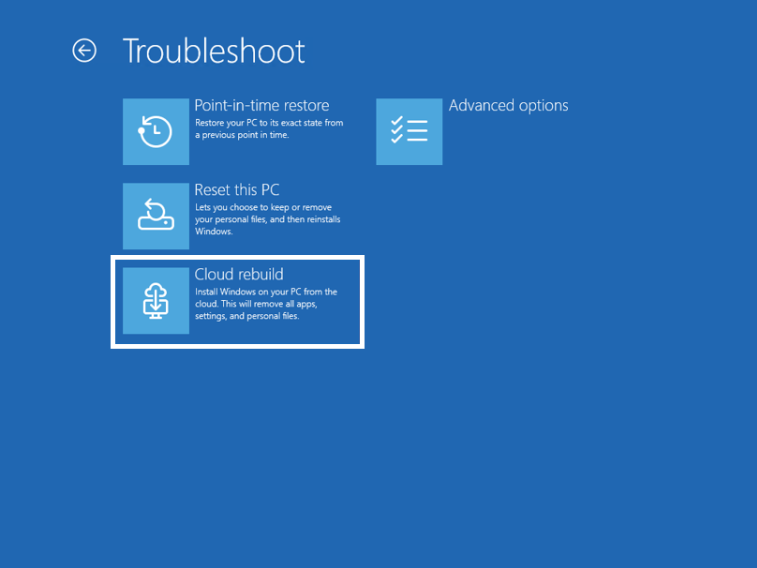
We’re introducing Cloud rebuild, a new recovery option that restores a Windows 11 PC to a clean, known-good state by performing a full OS reinstall, even when Windows won’t boot. Unlike Reset this PC, Cloud rebuild downloads both the target Windows image and the device’s drivers from Windows Update, so the device comes back fully functional without USB media, without a custom image, and without depending on the health of the currently installed OS.
In this preview, you can try Cloud rebuild today:
Start it directly from the Windows Recovery Environment (WinRE) by selecting Troubleshoot > Recovery and uninstall > Cloud rebuild.Connect over wired Ethernet or a Wi-Fi network from within WinRE.Review the target Windows build, edition, and language, then confirm the data-loss warning before the rebuild begins.
The new Cloud rebuild option in Windows Recovery Environment (WinRE), which enables a full Windows reinstall using files downloaded from Windows Update
Feedback: Share your thoughts in Feedback Hub (WIN + F) under Recovery > Cloud rebuild.
Fixed an issue where some applications that used HCS-managed virtual machines experienced issues when sharing host folders with Linux VMs using Plan9. Folders shared from the Windows host using Plan9 didn’t appear or couldn’t be accessed in the guest environment.
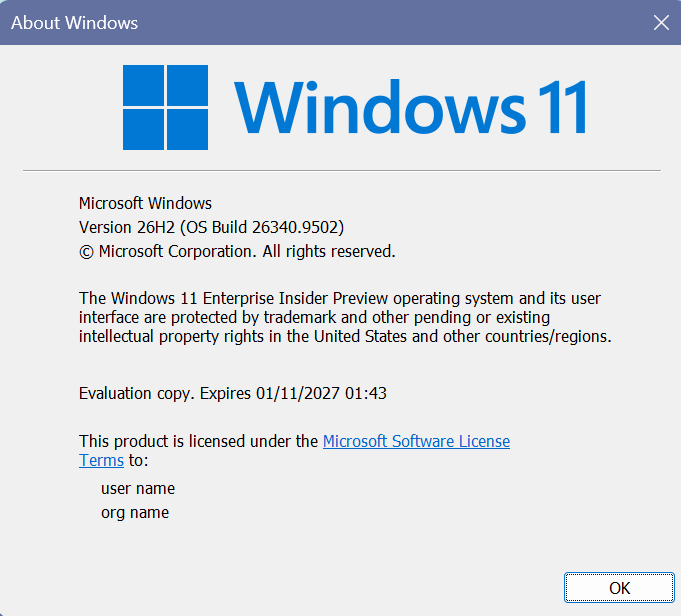
Hi all, last Friday Microsoft released Windows 11 Build 26340.9502 to the Experimental Channel
This build brings a new option to reset, clearing the disk thoroughly for repurposing the device without the risk of recovery of data, with the option to trigger it from intune in the future.
Smooth upgrading on all my Experimental Channel devices, Happy FLighting!
Changes and improvements gradually being rolled out
[Accessibility – Mouse indicator]
We’re introducing a sleeker new animation for the Mouse indicator. You can enable this animation under Accessibility settings. We’ve also added the option to keep the indicator activated until you press the Esc key.
[Magnifier]
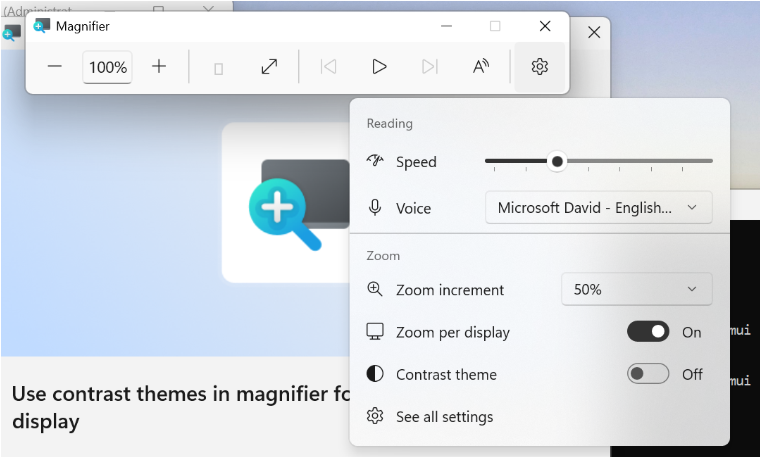
A new contrast theme toggle for a lower-glare screen. If bright screens are uncomfortable, many people use color inversion to reduce glare. However, inversion changes everything on screen, including photos, charts, and videos. With this update, we’re introducing a new contrast theme toggle in Magnifier.
Reduce glare with a single toggle. Turn on a contrast theme directly from the Magnifier toolbar for a more comfortable viewing experience.
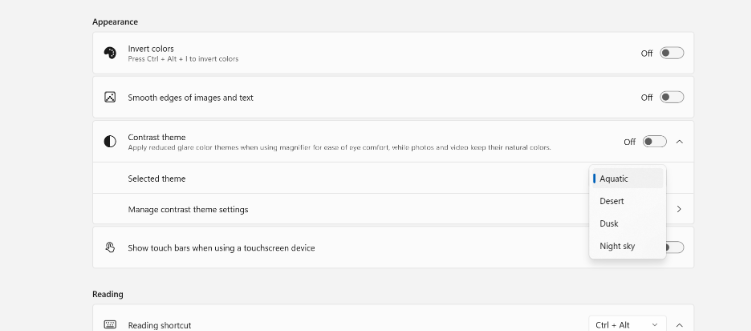
Choose the contrast theme that works best for you. The dark theme is applied by default, and you can choose which contrast theme the toggle uses under Settings > Accessibility > Magnifier.
Photos, videos, and charts keep their original colors. Unlike color inversion, the contrast theme recolors the interface without touching your photos, charts, or videos, so they keep their real colors.
Color inversion is still here. This isn’t a replacement. If you use inversion today, it works exactly as it always has. The contrast theme is a separate, purpose-built option to reduce glare when you want a darker interface without inverting colors.
UI showing the new contrast theme toggle in Magnifier
UI showing contrast theme settings for Magnifier.
[Cloud rebuild]
We’re updating Cloud rebuild, the recovery option that restores a Windows 11 PC to a clean, known-good state by performing a full OS reinstall, with two additions.
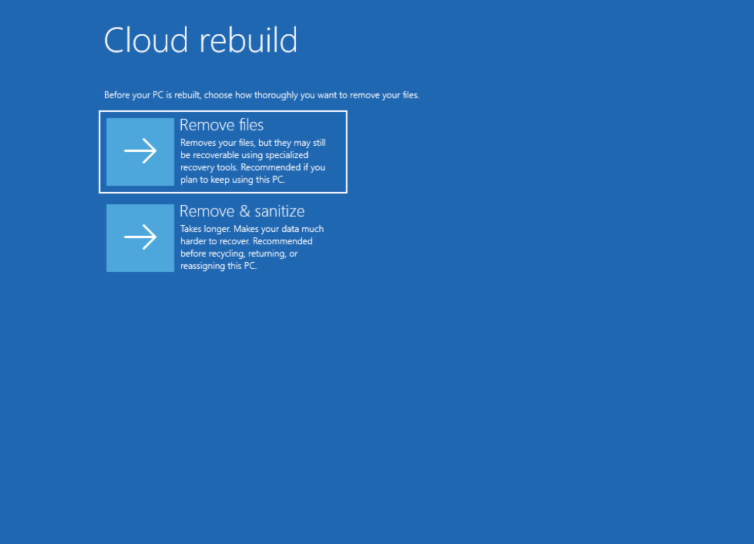
Cloud rebuild can now sanitize the device’s drives as part of the rebuild. When you start a rebuild in WinRE, choose Remove files if you’re keeping the PC, or Remove & sanitize files before recycling, returning, or reassigning it. The sanitize option uses the storage hardware’s erase capability to securely erase data before Windows is reinstalled and is irreversible.
IT administrators can now configure and start a Cloud rebuild remotely through the Recovery CSP, using either the currently installed build or a target build you specify.
UI showing new Cloud rebuild file removal options
[Live Captions]
We’re improving Live Captions with a new Include Screen Reader audio setting, which is off by default. With the setting off, Live Captions won’t transcribe audio from screen readers such as Narrator, JAWS, and NVDA, keeping captions focused on microphone and system audio.
[Hyper-V]
Fixed an issue where some applications that used HCS-managed virtual machines experienced issues when sharing host folders with Linux VMs using Plan9. Folders shared from the Windows host using Plan9 didn’t appear or couldn’t be accessed in the guest environment.
[Other]
Fixed an issue where backing up using File History unexpectedly failed with an error saying, “No usable drives found.”
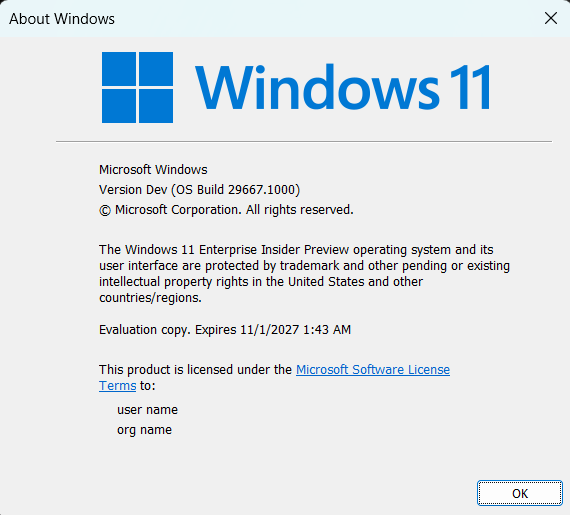
Hi all, last Friday Microsoft released Windows 11 Build 29667.1000 to the Experimental (Future Platforms) Channel
Smooth upgrades to this build, the Lost Pin access has not been fixed yet (Feedback Hub: https://aka.ms/AA13dolt)
Changes and improvements gradually being rolled out*
This update includes a small set of general improvements and fixes that improve the overall experience for Insiders running this build on their PCs.
[Windows Update]
Fixed an underlying issue resulting in some Insiders on Arm64 PCs not being able to upgrade to the latest builds and automatically rolling back. As a reminder, 0xc1900101 is a generic error code that can have multiple root causes. If you continue having issues, file a new piece of feedback.
[Emoji]
We’re adding support for Emoji 17.0. This includes new emoji such as distorted face, fight cloud, and hairy creature. To try the new emoji, press the Windows key plus Period (.) to open the emoji panel and insert them from there.
Examples of new emoji added with Emoji 17.0
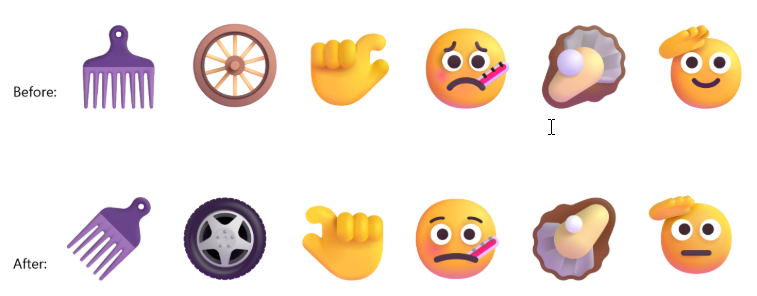
As part of this effort, we’ve also made some slight adjustments to the design of some of our current emoji to improve consistency across platforms. This includes the saluting face, face with peeking eye, goose, lotus, and kissing cat emoji.
Before-and-after examples of updated emoji designs
[Touchpad]
Fixed an issue causing touchpad zoom gestures to not work correctly in certain apps after the latest updates.
[Remote Desktop]
Fixed an underlying issue causing some Insiders to see graphics card error 0x11 when attempting to use Remote Desktop in the latest updates.
[Run]
Improved Run reliability for Insiders using the modern Run dialog.
[Taskbar]
Improved reliability of loading the system tray area of the taskbar.
[Network]
Fixed an issue resulting in some Insiders seeing an unexpected “The service to detect this status is disabled” message when opening Network and Sharing Center after the latest updates.
Fixed an underlying issue resulting in some Insiders not being able to connect to certain Wi-Fi types after the latest updates. File a new piece of feedback if you continue experiencing issues, including a recording of the issue if possible.
[Settings]
The Bluetooth quick settings page is now navigable using gamepad input.
[Known issues]
We’re investigating an issue where VMware Workstation Pro 17.6.4 may display a blank window when reopening a virtual machine after it has been created and closed. We are working on a fix and will provide an update in a future build.
We’re also aware of and investigating reports of VMWare devices green screening
Microsoft MVP in Windows and Devices, Technical Supervisor of Field System Engineers,
and passionate about Microsoft technologies.
I share practical knowledge on Intune, Microsoft Defender, Entra ID,
PowerShell, Windows management, security, and modern workplace solutions.
If my content, scripts, presentations, or community contributions have saved
you time or helped solve a problem, consider supporting my work and this blog.