In October 2014, Microsoft launched the Windows Insider Program and invited enthusiasts, IT professionals, developers, and curious users to help build the future of Windows. Twelve years later, that experiment has grown into one of the most successful customer feedback programs in the technology industry.
My Windows Insider Journey, From Day One
For me, this anniversary is also a personal one. I’ve been part of the Windows Insider community since day one, back when we were downloading those first Windows 10 Technical Preview builds and discovering what Microsoft’s new approach to Windows development would actually mean.
Over the past twelve years, I’ve installed more Insider builds than I could possibly count. Some were incredibly stable, others reminded you very quickly why they were called preview builds.
But that has always been part of the fun.
Being a Windows Insider means getting an early look at what Microsoft is working on, testing new ideas, reporting problems, and watching features evolve between builds. Sometimes a feature you really liked disappeared again. Sometimes something that initially seemed like a small experiment eventually became part of Windows used by millions of people.
For someone like me who works with Microsoft technology every day, the Insider Program has also been an invaluable way to stay ahead. It gives you the opportunity to understand upcoming changes before they reach customers and production environments.
After twelve years, I’m still excited when a new Insider build drops and there is something new to discover.
Windows Insider since day one, and still Insiding twelve years later.
From Test Builds to a Global Community
Over the past twelve years, the Windows Insider Program has evolved dramatically.
Insiders have helped test:
- Windows 10
- Windows 11
- New Microsoft applications
- Accessibility improvements
- Security features
- AI-powered experiences
- Device management capabilities
- User interface redesigns
The program itself also evolved. We’ve seen the introduction of Insider Rings, followed by the modern Channel model that includes Canary, Dev, Beta, and Release Preview channels. This provides organizations and enthusiasts with multiple levels of access depending on how much risk they are willing to accept.
For IT professionals, the Release Preview channel in particular has become an invaluable tool for validating business-critical applications before broad deployment.
Why the Insider Program Matters
Many Windows features that we take for granted today were refined thanks to Insider feedback.
Whether it was improvements to the Start menu, File Explorer, Windows Search, Windows Hello, accessibility features, or enterprise management capabilities, feedback collected through the Feedback Hub has influenced countless decisions over the years.
From an enterprise perspective, the program delivers several important benefits:
Early Validation
Organizations can test new Windows builds before deployment and identify potential compatibility issues early.
Better Deployment Planning
IT teams gain visibility into upcoming changes months before they reach production environments.
Influence on Development
Unlike traditional beta programs, the Windows Insider Program allows organizations to directly submit feedback and feature requests through official channels.
Improved Security
Many security features reach Insider channels first, giving security teams the opportunity to evaluate their impact and prepare for future rollouts.
The Program’s Lasting Impact on Windows
Perhaps the greatest achievement of the Windows Insider Program is that it fundamentally changed how Microsoft develops Windows.
The release cadence became more agile. Features could be validated earlier. Issues could be addressed before reaching millions of devices. Most importantly, customers became active participants rather than passive recipients.
Today, it feels normal for Microsoft to release preview builds every week and gather feedback continuously. In 2014, that level of transparency was unprecedented for an operating system used by hundreds of millions of people worldwide.
Looking Ahead
As Windows continues to evolve with AI-powered experiences, stronger security baselines, cloud integration, and support for new hardware architectures, the Insider community remains as important as ever.
Many of today’s innovations first appear in Insider builds before making their way into production devices. The program continues to serve as Microsoft’s proving ground for the next generation of Windows experiences.
Celebrate 12 Years With the Anniversary Wallpapers
Of course, an anniversary also deserves something special for your desktop.
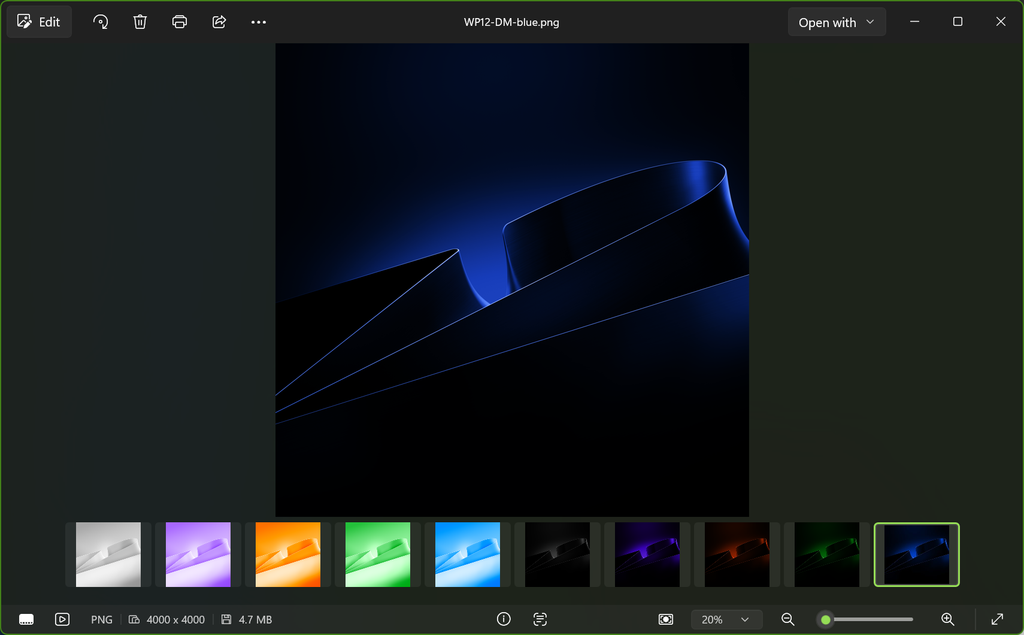
For the 12th anniversary of the Windows Insider Program, Microsoft has created special Windows Insider anniversary wallpapers, giving Insiders a nice way to celebrate the milestone on their own devices.
For long-time Insiders, wallpapers like these are more than just another desktop background. They are a small reminder of how far Windows and the Insider community have come since those first Windows 10 Technical Preview builds in 2014.
So if you’re celebrating twelve years of the Windows Insider Program, why not give your Insider PC an anniversary makeover as well?
And if you’re anything like me, there’s a good chance that anniversary wallpaper will end up on at least one of your Windows devices.
Here are the Wallpapers in Dark Mode and Light Mode:
Happy Anniversary, Insiders
Twelve years after its launch, the Windows Insider Program remains a remarkable example of collaboration between a technology company and its users.
Whether you’ve been installing preview builds since the very first Windows 10 Technical Preview in 2014 or you’ve only recently joined the program, every piece of feedback has contributed to shaping the Windows experience we know today.
Here’s to twelve years of testing, breaking things, finding bugs, submitting feedback, and helping build a better Windows for everyone.
Happy 12th anniversary to every Windows Insider, whether you joined in 2014 or installed your first Insider build this week.
Are you a Windows Insider? What was your favorite Insider feature or moment over the last twelve years? Let us know in the comments below.