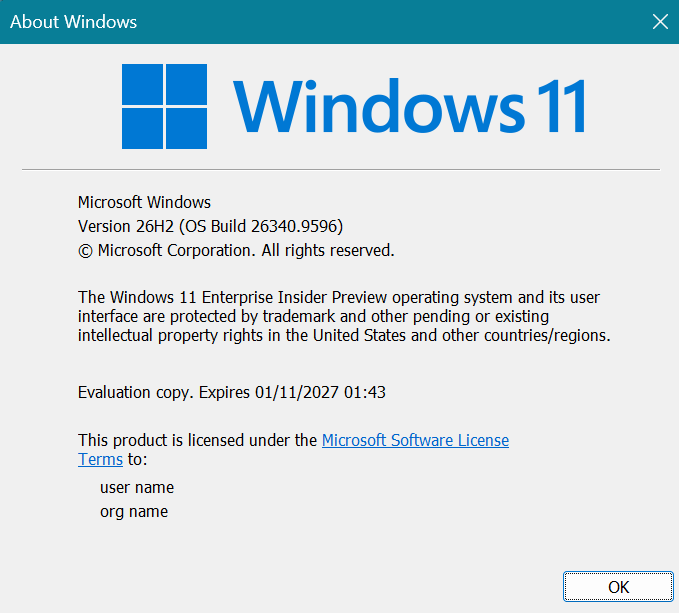
Hi all, last Friday Microsoft released Windows 11 Build 26340.9596 to the Experimental Channel
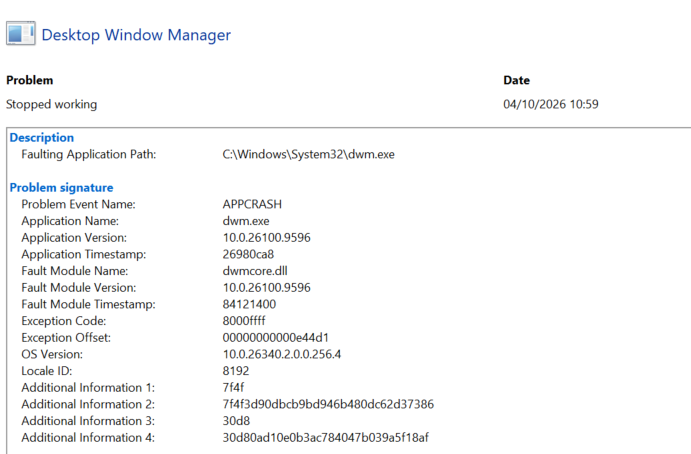
Smooth upgrades here, great spot by Maison da Silva, clicking an app card in the Microsoft store app crashes dwm.exe, resulting in a temporary freeze of the interface (Feedback Hub: https://aka.ms/AA13rrhh)
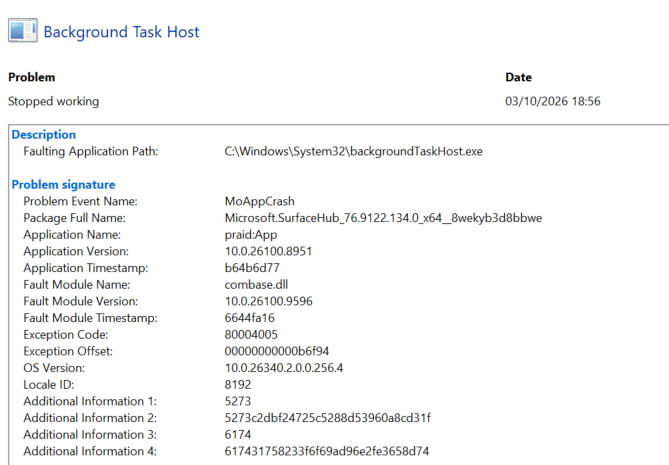
On Surface devices the surface app crashes repeatedly in the background without impact for the user (Feedback Hub: https://aka.ms/AA13rrpb) *** update, only reproduces with 2 monitors connected
Changes and improvements gradually being rolled out
[Unicode]
- We’ve updated Windows text shaping support for Unicode 17.0, helping Windows correctly display and shape newly encoded characters and scripts. Unicode 17.0 added 4,803 characters, including support for four newly encoded scripts: Beria Erfe, Sidetic, Tai Yo, and Tolong Siki.
- These updates help keep Windows text support current as the Unicode Standard evolves and improve support for languages and writing systems used by people around the world.
[File Explorer]
- Address Bar now supports ‘~’ , making it quicker to navigate directly to your user profile folder and subfolders (e.g., “~\AppData”).
[Settings]
- We’re making performance improvements to the Settings home page, which should result in reduced loading times in certain scenarios.
[Recovery]
- We’re adding a new entry point for Cloud Rebuild under Settings > System > Recovery, making it easier to access the feature from Settings.
Known issues
- We’re investigating an issue causing some Insiders to be unable to install the latest updates and see error 0x80073712. We believe this issue is related to having Windows Sandbox installed. As a workaround, try disabling Windows Sandbox.
source: Flight Hub