Tag: #Windows11

The Windows 11 Right-Click menu

Share this post:

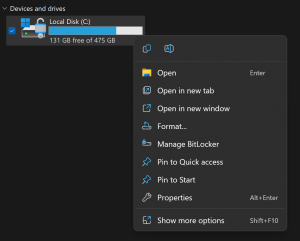
One of the most noticeable changes in Windows 11 is the new right-click menu that appears when you click on a file, folder, or desktop. The new menu is more compact and modern, with rounded corners and icons for common actions. It also integrates with Microsoft’s cloud services, such as OneDrive and Teams. Here are …
Continue reading

Share this post:

Announcing Windows 11 Insider Preview Build 25295

Share this post:

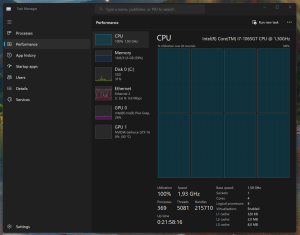
Hi all, Last Thursday Microsoft released Windows 11 Insider Preview Build 25295 to the Dev Channel. Upgrades went smooth here, spotted some new stuff: Task Manager shows a different results in performance & details tab (Feedback Hub: https://aka.ms/AAjlw92) As shown in the screenshot above CPU load seems 100% while the processor is only throttled at 1.93 Ghz, …

Continue reading

Share this post:

Splitting Audio from a Video File – ClipChamp

Share this post:

Need to split audio from a video file or just remove the sound track? This has become quite easy with the new inbox Windows 11 app ‘Clipchamp – Video editor’ If the app has not landed on your device yet or was removed, you can grab it in the Microsoft Store > here < lots …

Continue reading

Share this post:

Announcing Windows 11 Insider Preview Build 25281

Share this post:

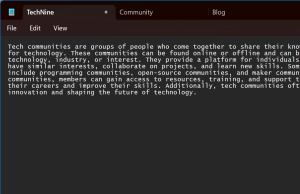
Hi all, last Thusday Microsoft released Windows 11 Insider Preview Build 25281 to the Dev Channel. Notepad is getting Tabs, currently rolling out to devices in the dev channel. Dedicated Blog Post Snipping Tool is running into a strange issue when using deffent DPI scaled monitors, the resulting snip might be missing a part in the resulting …

Continue reading

Share this post:

Announcing Windows 11 Insider Preview Build 25272

Share this post:

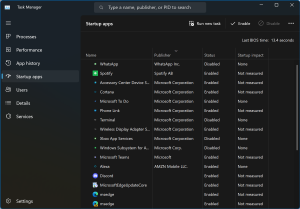
Hi all, Happy 2023 !, last Thursday Microsoft released Windows 11 Insider Preview Build 25272 to the Dev Channel, the 1st Insider release of the new year! My 1st impression after upgrade was ‘this feels faster’ than before… hard to quantify but overall performance & response seems even faster than with previous builds Startup pane in Task …

Continue reading

Share this post:

Announcing Windows 11 Insider Preview Build 25267

Share this post:

Hi all, Last Wednesday Microsoft released Windows 11 Insider Preview Build 25267 to the Dev Channel. [Changes and Improvements] [Search on the Taskbar] [Windows Security] Fixes [General] [Taskbar & System Tray] [Search on the Taskbar] The fixes only apply for Windows Insiders who received one of the different treatments for how search looks on the taskbar that …

Continue reading

Share this post:

Announcing Windows 11 Insider Preview Build 25262

Share this post:

Hi all, Last Friday Microsoft Released Windows 11 Insider Preview Build 25262 to the Dev Channel. At 1st only my devices not connected to a Domain or Azure AD got the update, by Saturday morning that issue was resolved The December Bug Bash is on (through to 11:59pm PST December 12th), check your Feedback Hub / …

Continue reading

Share this post:

Announcing Windows 11 Insider Preview Build 25252

Share this post:

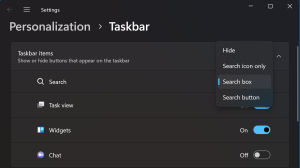
Hi all, last Monday after a delay due to the holidays Microsoft released Windows 11 Insider Preview Build 25252 to the Dev Channel. This build adds the option of choice to the taskbar search icon behavior, a welcomed update for most After testing the options my personal favorite is the ‘Search box’ option like the experience …

Continue reading

Share this post:

Microsoft Technical Takeoff

Share this post:

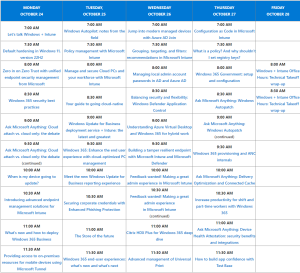
Next week, starting October 24th 2022, Microsoft is organizing the “Microsoft Technical Takeoff – Windows + Intune” Here’s an overview of the schedule: head over to the technical community site for more details, sign up & calendar reminders: https://aka.ms/TechnicalTakeoff Lots of interesting topics, Hope to see you there!

Share this post:

Announcing Windows 11 Insider Preview Build 25227

Share this post:

Hi all, last Wednesday Microsoft released Windows 11 Insider Preview Build 25227 to the Dev Channel. Upgrades went smooth here, a few newly spotted feedback items: Snap layouts get fooled by dpi difference on monitors for certain store apps (https://aka.ms/AAifiyg) GSOD / Crash on restart after network disappears (https://aka.ms/AAigqyc) Happy Upgrading! What’s new Update Management Improvements Ensuring …

Continue reading

Share this post: