
Hi all, last Monday Microsoft released Windows 11 Build 26300.8772 to the Experimental Channel, a few days later than the usual Friday release, the 4th of July celebrations might have had something to do with that.
Cloud rebuild is here, an interesting new option hoping this option will be available from media boot too (recovering a device with new of empty storage)
Upgrades went fast and smooth on all my devices in this channel, Happy Flighting!
Changes and improvements gradually being rolled out
[Recovery]
- We’re introducing Cloud rebuild, a new recovery option that restores a Windows 11 PC to a clean, known-good state by performing a full OS reinstall, even when Windows won’t boot. Unlike Reset this PC, Cloud rebuild downloads both the target Windows image and the device’s drivers from Windows Update, so the device comes back fully functional without USB media, without a custom image, and without depending on the health of the currently installed OS.
- In this preview, you can try Cloud rebuild today:
- Start it directly from the Windows Recovery Environment (WinRE) by selecting Troubleshoot > Recovery and uninstall > Cloud rebuild.
- Connect over wired Ethernet or a Wi-Fi network from within WinRE.
- Review the target Windows build, edition, and language, then confirm the data-loss warning before the rebuild begins.
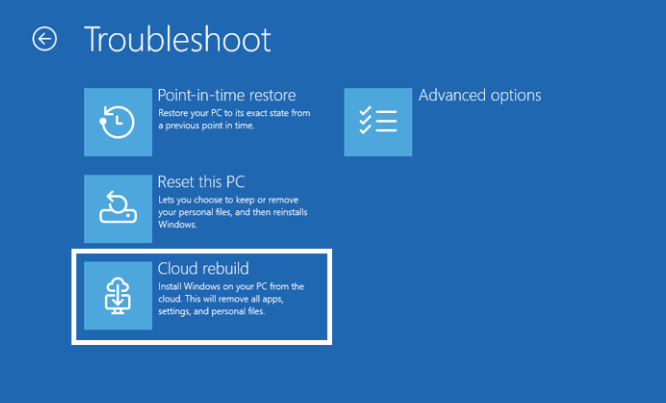
Feedback: Share your thoughts in Feedback Hub (WIN + F) under Recovery > Cloud rebuild.
To learn more, see https://aka.ms/CloudRebuild.
[Backup and restore on by default for commercial]
- Starting in Windows 11, version 26H2, the backup policy of Windows settings backup and restore will be enabled by default on eligible Microsoft Entra joined or Microsoft Entra hybrid joined devices. Windows settings backup is no longer something admins must configure first. It becomes a resilience baseline that automatically captures user settings and the Microsoft Store app list. So, when a device is reimaged or reset, users can return to a familiar setup without relying on prior configuration, improving recovery consistency, and reducing time to productivity.
- Admins remain in full control: existing policies still apply, explicit configurations override the default, and restore remains opt-in and admin-managed. By making settings backup the default, this change establishes a more resilient, recoverable device experience, minimizing disruption and reducing setup friction.
[Account Control]
- The Windows 11 Account Control flyout has a refreshed, modern design and a clear subscription badge to make the user’s account status instantly visible. This helps users easily identify their plan, discover benefits, and explore upgrades.
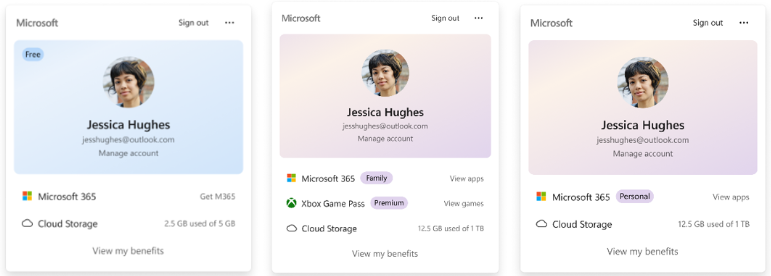
Feedback: Share your thoughts in Feedback Hub (WIN + F) under Settings > Start Menu.
[Search]
- Correction (7/7/26) – The increased height of the search box by 4 pixels was inadvertently noted as in this release – it will be included in a future Insider build.
[Settings]
- The Bluetooth quick settings page is now navigable using gamepad input.
[Taskbar]
- Fixed issue where the search icon might be invisible when using the taskbar in a vertical position.
[Run]
- Improved how keyboard focus is announced for screen readers when using the new Run design.
[Fonts]
- Improved Mongolian Baiti shaping and rendering behavior to ensure accurate and consistent text output, increasing text fidelity for Mongolian script.
[Other]
- If you were having issues with Outlook not responding to the close button last week, that should be addressed now.
- Improved resource usage over time of title bar tooltips.
source: Flight Hub