
Hi all, last Friday Microsoft released Windows 11 Build 28020.1921 to the Experimental (26H1) Channel
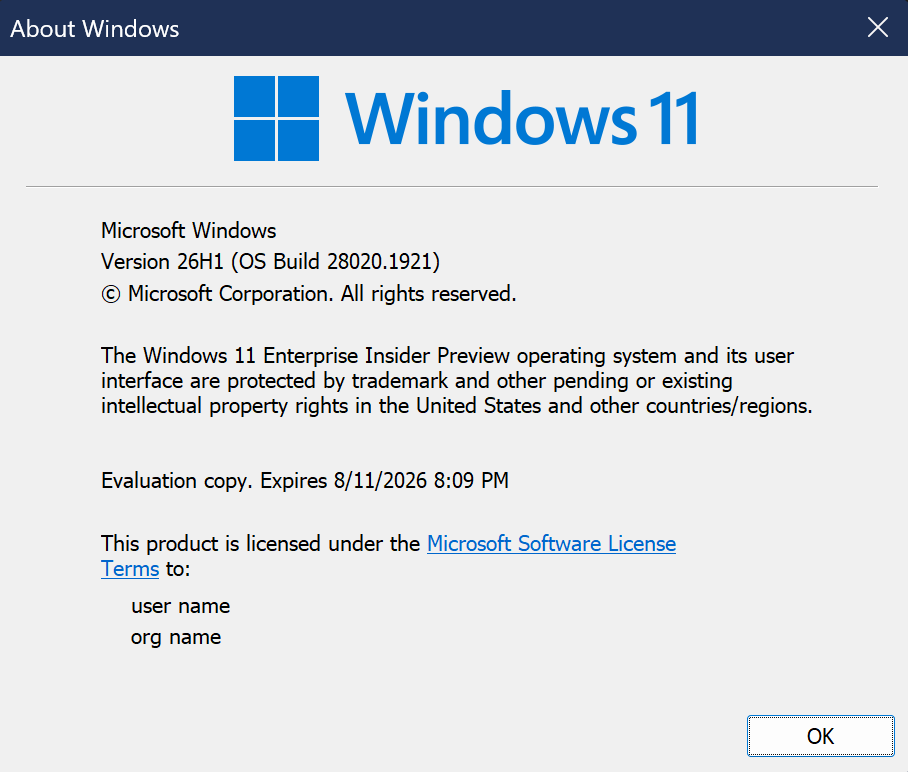
All smooth upgrades on my 26H1 devices, new Insider build names are now available in settings
Changes and improvements gradually being rolled out*
- This update includes a small set of general improvements and fixes that improve the overall experience for Insiders running this build on their PCs.
[Windows Insider channel movement]
As announced in the Windows Insider Blog, we will begin moving users in the Canary 28000 Series Channel to the new Experimental (26H1) channel.
[Task Manager]
We’re making a few improvements to Task Manager:
- We’re updating Task Manager to provide better insight into NPU usage for PCs that include an NPU. New optional NPU and NPU Engine columns are now available on the Processes, Users, and Details pages. The Details page also adds NPU Dedicated Memory and NPU Shared Memory optional columns to give you deeper visibility into how workloads are using NPU resources. Additionally, if there are neural engines that are part of a GPU, they will now appear on the Performance page, providing a more complete view of AI‑related system activity.
- We’re also adding a new optional Isolation column to the Processes and Details pages, allowing you to see which apps are running in an AppContainer.
- Fixed accuracy of CPU speed display on the Performance page of Task Manager for VMs after resume from hibernate, so it doesn’t sometimes show unexpectedly high unrealistic numbers.
Once these changes are available to you, you can add any of the new columns by right‑clicking a column header in Task Manager and selecting them from the menu.
Feedback: Share your thoughts in Feedback Hub (WIN + F) under Task Manager.
[Feedback Hub update]
Thanks Windows Insiders who have been sharing feedback about the Feedback Hub – we’re now rolling out version 2.2604.301.0. This update contains a number of improvements based on what you’ve been telling us, including:
- Generally improved reliability.
- More tweaks to improve general design fit and finish, accessibility, and localization.
- The Community feedback section for non-English now allows you to switch view to English if you’d prefer.
- Collection titles and Official responses now will be automatically translated in top languages.
- The file upload limit when submitting feedback is back up to 500 MB.
- Improved upvote and comment count accuracy for feedback.
Please keep the feedback coming! If you want to share any thoughts, you can file them in the Feedback Hub under Apps > Feedback Hub.
source: Windows Blogs