
Hi all, last Friday Microsoft released Windows 11 Insider Preview Build 27950 to the Canary Channel.
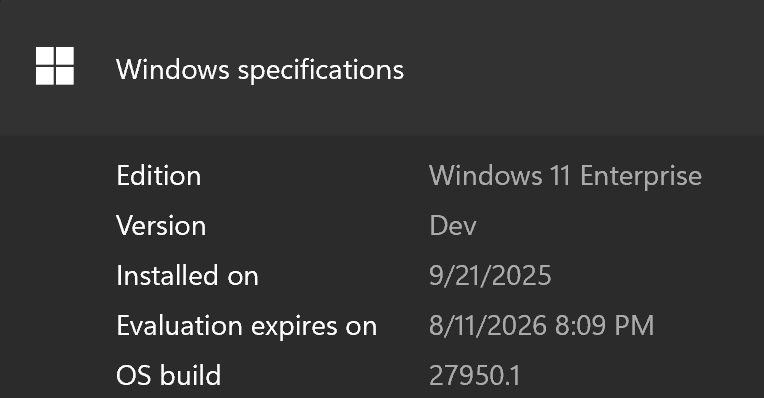
This was a bumpy road for My Surface Laptop 13, since connecting it to na HP Essential USB-C dock, multiple GSOD occurred even after disconnecting the Dock (Feedback Hub: https://aka.ms/AAy044v)
During the Upgrade to This Build, the device kept running into GSOD, after multiple attempts it did successfully update and seems quite stable now, I did need to set up my Windows Hello Pin before I could use it again.
All other Canary Devices had a smooth ride on this flight, Happy Upgrades!
Changes and Improvements
[General]
- This update includes a small set of general improvements and fixes that improve the overall experience for Insiders running this build on their PCs.
[Settings]
- Advanced Settings will revert to the previous “For Developers” experience after updating to this build. This change will come back soon.
Fixes
[General]
- Fixed an issue causing some Insiders to experience a rollback attempting to install the latest build with either an 0xC1900101-0x20017 error or 0xC1900101-0x30017 error.
[Taskbar and System Tray]
- Fixed an issue which could cause the app preview windows in the taskbar to become misaligned (away from the app icon you’d clicked / hovered over) after a display resolution change.
[File Explorer]
- Fixed an issue where interacting with the context menu in File Explorer could lead to the body of File Explorer becoming unresponsive to clicks.
- Fixed an issue which could lead to certain apps hanging when launching the Open or Save Dialog.
- Fixed an issue where with certain apps installed, when you right clicked you may see the context menu unexpectedly switch back and forth with each right click between the normal initial view and “Show more options”.
[Graphics]
- Fixed an which was causing some Insiders to experience screen flickers when using the browser (and potentially other scenarios) in the latest Canary builds.
[Audio]
- If you were having issues with audio not working after the latest updates, that should be resolved now. Audio issues can have multiple root causes, though, so if you continue experiencing issues, please file feedback under Devices and Drivers > Audio and Sound in the Feedback Hub, if possible including a trace by using the “Capture the issue” option in Step #4 of the problem report.
[Dynamic Lighting]
- Fixed an issue in Dynamic Lighting where the Dynamic Lighting Background Controller would occasionally consume excessive CPU after unlocking the machine.
[Other]
- We’ve done some underlying work to help improve performance when gaming with game bar or other overlays on top of your game. This may particularly help those with multiple monitors which have different refresh rates. As always, if you’re experiencing game performance issues, please file feedback including a trace of the issue, following these steps. Thanks Windows Insiders who’ve shared feedback so far!
Known issues
[General]
- We’re working on the fix for an issue causing some Insiders with Arm64 PCs to experience an increase in bugchecks (green screens) with error IRQL_NOT_LESS_OR_EQUAL in the latest Canary builds.
[For developers]
- PIX on Windows is unable to play back GPU captures on this OS version. This will be addressed by a new PIX release, estimated to arrive by the end of September. In the meantime, if you are impacted, you can use the “Send Feedback” button in PIX or contact us on the DirectX Discord server and we can help provide private builds.
source: Windows Blogs